
No access by default, read only first, and never more than the person using it.
What it means
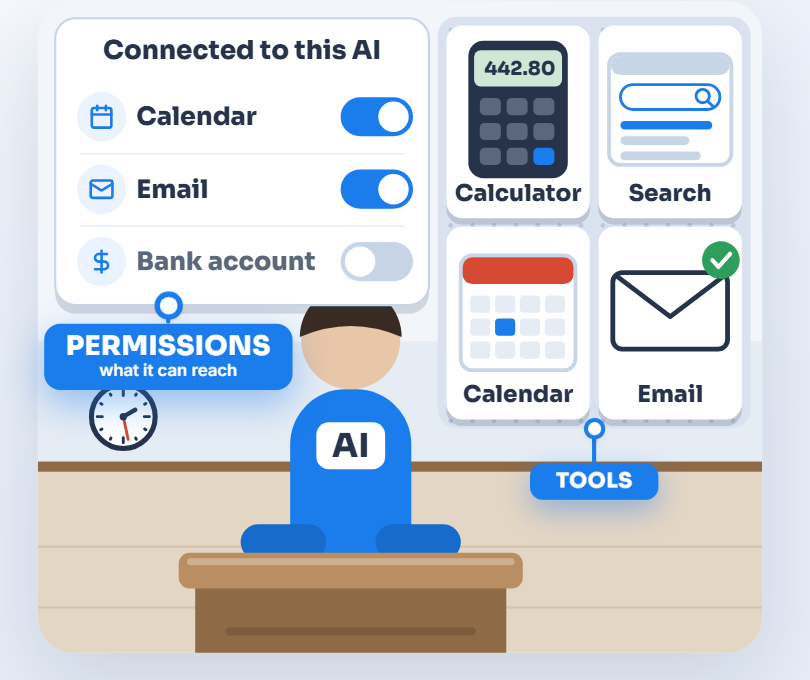
There are two ways to secure anything. One gives broad access and tries to block bad things as they appear. The other blocks everything and allows only what’s approved. The first fails quietly, because you can’t block what nobody thought of. The second fails safely, because something new doesn’t run until someone approves it. This is what security people call Zero Trust. For AI it applies in three places: what each AI tool can reach, what shared assistants are given, and what level of access each connection gets.
An AI should never get more access than the person using it, and often needs less. People keep “internal” apart from “what we tell customers” without being asked. An AI can’t be relied on to do that, so limit what it can reach.
Letting someone do through an AI what they can’t do directly turns the AI into a back door: anyone who can talk to it, or any email it reads, gets its access. When a job truly needs it, such as a customer checking their own order status, build the limit into the system: a fixed set of actions, on that person’s own records only, checked by the software rather than by the AI’s instructions, and logged.
A simple example
A team assistant is given payroll, HR files and daily reports so it can answer questions. Those files were locked down carefully, but anyone who can use the assistant can now ask it for them. It’s the early 2000s spreadsheet problem again. Back then, important numbers sat in one file and nobody controlled who saw it once it was emailed around.
A second example we’ve seen in vendor training material: a sample HR assistant can read every employee’s leave balance, and its only protection is an instruction telling it not to share other people’s. Instructions like that can be worked around. The safer setup lets the assistant read only the leave balance of the person asking.
Do it yourself
For every AI tool
- Write down the one job each AI tool is for.
- List the systems, folders and records that job needs, and grant only those.
- Leave everything else off, including extras and connections, until there’s a reason to turn one on.
- Look again whenever the job changes.
For shared assistants
- Split assistants by job and by sensitivity, so a general office assistant and an HR assistant don’t share what they know.
- Keep sensitive files out of assistants that many people use.
- Prefer connections that check each person’s own permissions over uploading copies of files.
- Keep an assistant that talks to customers limited to what you’d tell a customer.
- Keep personal chats and files private by default, and share them on purpose.
For access levels
- Sort each AI connection into one of four levels:
- reads ordinary information;
- reads sensitive information;
- changes things;
- can’t be undone (deleting, paying, sending outside the company).
- Grant each level on its own.
- For the last two levels, start with a person approving each action, and widen that only as the tool proves itself on that kind of work.
How to check
- For each AI tool, ask “what can this reach that its job doesn’t need?” If the honest answer is “everything the person using it can see”, it needs narrowing.
- Sign in as a junior employee and ask each shared assistant for the payroll file or a salary. If it gives you either one, take the payroll files out of that assistant.
- List every AI connection and write its level next to it. Anything that can delete, pay or send outside the company without a person seeing it first needs a second look.
What that misses
People add access to get a job done and rarely remove it afterwards, and assistants keep getting new files. When you connect a tool, it often asks for more access than it needs. A test question only finds what you think to ask, and a tool’s own “read only” label isn’t proof.
What we do for you
We set each AI tool up with only what its job needs, read only wherever the job allows, and connect assistants so each person sees only what they’re already allowed to. Anything that changes, sends or deletes waits for a person’s approval. On a schedule, we review that access with you and retest what each shared assistant will give out.
“What we do for you” describes work we do for our clients, and what’s included depends on your plan. Already a client? Your engineer can tell you what your plan covers.
Back to all rulesGet the full guide
Technology, managed by people.
The real McCoy: real oversight, real understanding, real answers. Start with a free AI Check.