
Keep Your Devices Secure, Organized, and Easy to Manage.
Every employee laptop, school device, mobile phone, and tablet plays a role in your organization’s day-to-day operations.
As your organization grows, keeping those devices secure, updated, and properly managed becomes increasingly difficult.
Electric Software uses Microsoft Intune to help organizations manage devices from one central platform, making it easier to protect sensitive information, support employees wherever they work, and ensure every device follows the same standards.
The result is a more secure, more organized environment that’s easier to support and simpler to manage.
Intune: A Smarter Way to Manage Devices
Across Your Organization.
Managing devices across an organization has become more complicated than ever. Employees work from different locations, devices connect from different networks, and sensitive information travels everywhere people do.
Microsoft Intune helps bring consistency, security, and control to the devices your organization relies on every day.
Keep Devices Consistent
Make sure every laptop, desktop, tablet, and mobile device follows the same standards, settings, and security requirements, without manually configuring each one.
Protect Organizational Data
Help keep sensitive information secure with built-in controls that protect access to data, applications, and accounts across all managed devices.
Simplify Employee Onboarding
Get new employees up and running faster with devices that are configured, secured, and ready to use from day one.
Support Remote & Hybrid Work
Manage and secure devices whether employees are in the office, working remotely, or moving between locations.
Reduce Day-to-Day IT Work
Automate routine device management tasks so less time is spent troubleshooting, updating, and manually maintaining devices.
Stay in Control
Gain visibility into your organization’s devices, apply policies consistently, and respond quickly when changes are needed.
What Is Microsoft Intune?
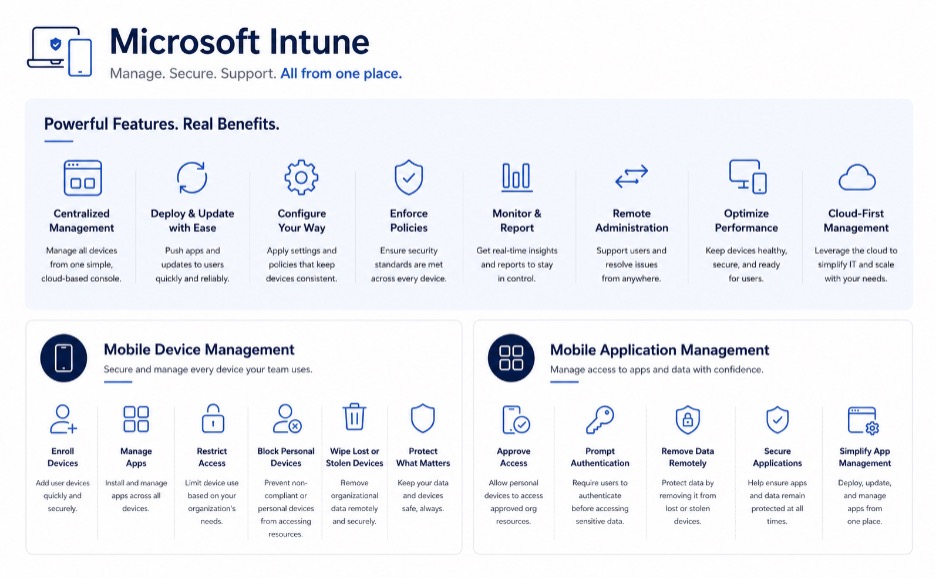
Microsoft Intune is a cloud-based device management platform that helps organizations manage, secure, and support laptops, desktops, tablets, and mobile devices from one central location.
In practical terms, it allows your organization to set up devices faster, apply security settings consistently, manage updates automatically, and protect organizational data across every device your team uses.
Instead of configuring and maintaining devices one at a time, Intune helps bring everything under one standard, making devices easier to manage, easier to support, and more secure as your organization grows.
Talk to an Intune Expert Engineer
How We Help Organizations Get More from Microsoft Intune
Cross-Platform Endpoint Management
Manage and support devices across Windows, macOS, iOS, Android, and other supported platforms from a single location.
Keep devices configured consistently, apply policies centrally, and maintain greater control across your environment.
Built-In Endpoint Security
Strengthen device security with centralized policies, compliance requirements, access controls, and protection measures designed to reduce risk.
Help ensure devices remain secure, regardless of where employees work.
Endpoint Analytics & Reporting
Gain visibility into device health, performance, compliance, and user experience.
Use reporting and insights to identify issues earlier and make more informed decisions about your environment.
Mobile Application Management
Deploy, update, and manage business applications without manually configuring every device.
Ensure employees have access to the tools they need while helping protect organizational data.
Shared & Specialized Devices
Support devices used by classrooms, front-line employees, kiosks, shared workstations, and other specialized environments.
Maintain consistent settings while simplifying administration and user access.
Device Configuration & Policy Management
Apply security settings, device standards, and organizational policies consistently across every managed device.
Reduce manual configuration while improving reliability and compliance.
Microsoft Intune Services Built Around Your Organization.
Whether you’re starting from scratch, testing a pilot deployment, or looking for guidance on the best path forward, we can help.
Option 1.
Intune Foundation
Starting at $8,000
For organizations ready to establish a secure, well-managed device environment.
What’s Included
- Business & technical requirements review
- Intune planning workshop
- Security & configuration best practices
- Deployment roadmap
- Project coordination & implementation guidance
Best For
Organizations deploying Microsoft Intune for the first time.
Option 2.
Intune Jumpstart
Starting at $9,000
For organizations that want to validate their approach before rolling out Intune across the entire organization.
What’s Included
- Pilot deployment
- Device management configuration
- Security policy setup
- Best practices guidance
- Project coordination
Best For
Organizations looking to test and refine their Intune strategy before a full rollout.
Option 3.
Not Sure What You Need?
Let’s Talk
Every organization is different.
If you’re not sure whether Intune is the right fit, or you’re trying to understand what options are available, we’re happy to help.
What’s Included
- Initial consultation
- Environment discussion
- Guidance on available options
- Answers to your questions
Device Management Foundation
Starting at $7,500
A streamlined Microsoft Intune deployment designed for organizations with up to 300 users.
This service helps organizations improve device security, simplify administration, and establish a consistent management framework without a lengthy implementation process.
Includes
- Device enrollment & configuration
- Core security policies
- Device compliance standards
- Application deployment setup
- Administrator knowledge transfer
- Deployment completed in as little as two weeks +
The Experience You’ll Have With Us
Our customers say it best. We become part of your team, proactive, responsive, and always in your corner.
Get Started
Let’s Talk About Your Device Management Goals.
Whether you’re planning an Intune deployment, looking to improve security, or simply trying to understand your options, we’re here to help.
Fill out the form below and a member of our team will reach out within one business day. We’ll learn about your current environment, answer your questions, and help determine the best path forward for your organization.

Common Questions
Where to go next
Intune fits inside our broader managed IT services, and it pairs naturally with co-managed IT when you have an internal admin. Not sure what your fleet needs? The free IT check is the fastest way to find out.
What Our Clients Say
Thorough, Efficient, and Reliable I appreciate how thorough Electric Software is in their work. When I requested to stop access for a terminated employee, the turnaround time was impressive. Since we started working with them, we’ve seen significant improvements, our internet is better, we all have company computers, and we have consistent support for any tech issues that arise.
Carmen J. · Operations & Development Director, enrichment center
The biggest benefit we’ve experienced is not having to maintain in-house expertise for every technical challenge that arises. With Electric Software’s broad skillset and reliable support, we’re able to access specialized knowledge exactly when we need it, without the cost and complexity of hiring and maintaining that expertise internally. Electric Software recently guided us through the migration of our four websites to their hosting platform. They managed the entire process with efficiency and professionalism, making the transition smooth and worry-free. As an added benefit, the move has already resulted in meaningful cost savings for our organization. We also appreciate Electric Software’s consistently timely responses to support tickets. Their team works as a true partner, taking the time to understand our challenges and helping identify the best solutions, rather than offering one-size-fits-all answers.
Kelly T. · Executive Director, industry commission
Questions People Ask About Microsoft Intune.
Do we need to buy Microsoft Intune separately?
Not usually. Intune is included in most Microsoft 365 Business Premium and Enterprise plans. If you’re already paying for one of those, you already own Intune, you just need it configured and managed properly. We’ll confirm what’s included in your current licensing before we start.
Will Intune let our IT team see personal data on employee phones?
No. Intune separates work data from personal data. We can secure and remove the work side without ever touching personal apps, photos, or messages. Employees keep their privacy. The organization keeps its data.
How long does an Intune rollout actually take?
A focused deployment (Device Management Foundation) takes about two weeks for organizations up to 300 employees. Larger or more complex environments take longer. We give you a clear timeline before we start, no open-ended projects.
What if we already have some devices managed and some that aren't?
That’s the most common situation. We start with an assessment of what’s already in place, then bring everything under one consistent policy without disrupting day-to-day work.
Do you keep managing Intune after the initial setup?
Yes, if you want us to. Our managed IT clients get ongoing Intune management as part of their service. Standalone deployment is also an option if you have internal IT that will take over.
Technology, managed by people.
The real McCoy: real oversight, real understanding, real answers. Start with a free IT and security check.
Prefer to see it instead of read it? Take the 3D tour of how we work.