
Use business AI accounts with terms you’ve checked, never personal ones.
What it means
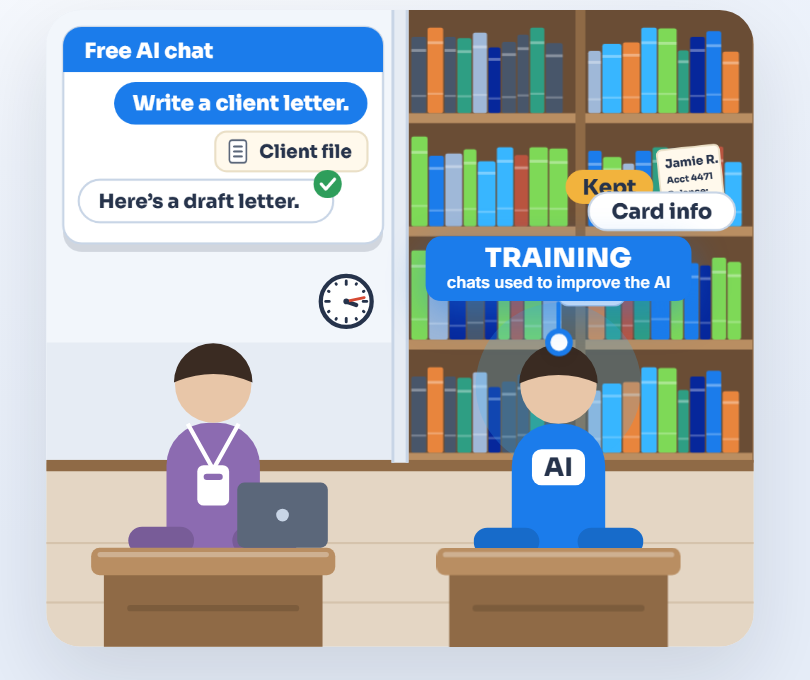
The same AI tool can have very different rules depending on the account. Business accounts under a company agreement come with admin controls and terms that keep your data out of model training by default. Free and personal accounts often allow training, and some have people review chats.
A simple example
Two staff members ask the same AI tool to tidy up a customer letter. One uses a company account and the other a free personal one. Only the company account comes with the company’s agreement and controls.
Do it yourself
- Find out who uses which AI tools, and on which account. Ask staff, ideally with a short anonymous survey. Check the apps connected to your Microsoft 365 or Google accounts (the same screens as rule 3), and check card statements for AI subscriptions.
- Choose the tools you’ll approve, and set them up on business accounts the company owns.
- Move staff across, and ask them to stop using personal accounts for work. Anything saved in a personal account stays with that account, so move what the business needs first.
Also
- Check the AI switches inside apps you already pay for, like your CRM, accounting or help desk. Some are on by default, so decide each one deliberately.
- Data kept out of training can still be stored, so check how long each vendor keeps it.
How to check
For each AI tool in use, write down whose account it is and what the terms say about training and how long data is kept.
What that misses
A survey only finds the tools people remember to mention. It won’t show browser extensions or AI tools installed on computers.
What we do for you
We find what’s in use with tools our clients already have, such as web filtering, app control on computers and the Microsoft 365 or Google admin reports, and give you one list. Then we set up the approved tools on company accounts and check their terms. We keep the list up to date as tools come and go.
“What we do for you” describes work we do for our clients, and what’s included depends on your plan. Already a client? Your engineer can tell you what your plan covers.
Back to all rulesGet the full guide
Technology, managed by people.
The real McCoy: real oversight, real understanding, real answers. Start with a free AI Check.